


Guardian Feast: Daily Recipes
4.227.00 Reviews
App Specs
- Version
- 1.0.0.698
- Updated On
- License
- Free
- Downloads
- 100,000+
- Developer
- Guardian News & Media Ltd
- Categories
- Food & Drink
- Platform
- Android
Screenshots




 Analysis by AppCompare
I like a recipe app best when it helps me answer a real question: what can I cook tonight with the time, ingredients, and energy I actually have? Guardian Feast: Daily Recipes is aimed at that everyday moment, pairing cooking inspiration with practical guidance rather than treating recipes as something to browse only when I’m planning a special meal. It’s a free Food & Drink app from Guardian News & Media Ltd, and its appeal is strongest for people who enjoy discovering dishes as much as following them.
That free starting point makes it easy to try without committing to a subscription up front. There are in-app purchases priced from $3.99 to $38.99 per item, so I’d check what a particular purchase unlocks and whether it suits my cooking habits before paying. The useful distinction is that downloading the app is free, while some paid options may be available inside it; the price range alone doesn’t tell me which option offers the best value for an individual cook.
How I’d judge the value in everyday use
A recipe collection earns its space on my phone when I use it to make meals I would otherwise struggle to plan. The strongest value here is the mix of inspiration and cooking support described in the app: I can look for a dish, follow its instructions, and keep recipes I want to return to. For someone who tends to repeat the same few dinners, that kind of guided discovery can make planning feel less routine without requiring a separate cookbook for every cuisine.
The app has an average rating of 4.1 from 794 ratings, alongside 27 written reviews. I treat those numbers as a broad signal of how people respond, not as a guarantee that every recipe or tool will suit me. Its 100K+ installs suggest that it has found an audience, but the more relevant test is whether the recipes match my tastes and whether I’ll open the app often enough to benefit from any paid option.
Where the experience needs a little judgement
Recipe apps can make every dish look equally practical, but a tempting photo doesn’t tell me how well a recipe fits a busy evening, a tight food budget, or the ingredients already in my cupboard. I’d scan the ingredient list and the full method before choosing, especially if I’m cooking for someone with a dietary restriction. Filters can speed up discovery, but I still need to check the recipe itself rather than treating a label as a substitute for reading.
There’s also a difference between a useful kitchen companion and a complete meal-planning system. If I want a carefully coordinated weekly plan, automatic pantry tracking, or a shopping workflow tailored to my household, I’d compare those needs against the tools actually available in the app before relying on it. The app’s grocery-list feature may help organize ingredients, but I wouldn’t assume it handles every planning task I might want.
Who is most likely to get something from it?
I’d recommend giving it a look if you like trying new dishes, want clear recipe guidance, or need a more engaging way to decide what to cook. It should be particularly appealing to a curious home cook who wants inspiration but still appreciates structure once it’s time to start chopping. The Everyone content rating also makes it broadly accessible, though the recipes themselves still need to fit the needs and abilities of the people who will eat them.
Worth Reading Before You Choose

Flipboard Shows What News Apps Must Do Beyond the Feed

Switching to Android Auto Means Rethinking Your Driving Routine

Google Calendar Makes a Crowded Week Easier to Manage

Ludo King Makes the Most of the Minutes Between Plans

Baby Panda World Brings Quick Play to Modern Phones, but Its Game Library Feels Busy

ESPN’s Live Game View Makes Following Close Games Easier
If you already have a dependable collection of recipes and mainly need precise nutrition tracking, strict allergen controls, or a highly customized meal schedule, a specialist app may be a better match. Likewise, someone who prefers to cook from a printed book or search the web only when a specific dish comes to mind may not use a dedicated recipe app enough to justify an optional purchase. I’d start with the free experience and decide from actual use, not from the promise of a larger collection.
A practical way to try it before paying
My approach would be to choose one ordinary meal I need to make, then browse for a recipe that fits the time and ingredients I have. I’d read the method before shopping, note any unfamiliar ingredient or technique, and use the grocery list only for items I genuinely need. After cooking, saving a recipe I’d make again is more useful than collecting a long queue of dishes I may never try. This small test reveals whether the app fits my routine without turning recipe browsing into another chore.
That workflow also helps me judge the paid options fairly. If the free access already gives me enough inspiration and guidance, there may be no reason to spend. If I keep returning and find that an in-app purchase solves a specific problem for me, I can weigh its stated price against how often I expect to use it. I wouldn’t pay simply because a recipe app offers more content; I’d pay only when the added value is clear in my own kitchen.
Getting Started with Guardian Feast
First off, installing Guardian Feast: Daily Recipes was a breeze. A quick download, a few taps, and I was ready to explore. Upon opening the app, I was greeted with a clean, user-friendly interface that didn’t overwhelm me with options. The main dashboard is neatly organized, allowing easy navigation between categories like Breakfast, Lunch, Dinner, and Desserts.
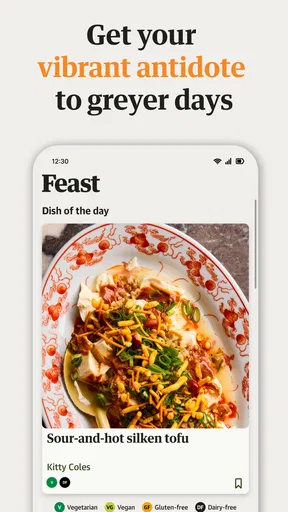
What caught my eye immediately was the daily recipe feature. I love surprises, especially when they come with a side of potential deliciousness! Each day, the app offers a new, curated recipe, promising to keep my culinary adventures fresh and exciting.
Diving Into the Culinary World
The app is packed with a plethora of recipes, each more tempting than the last. I found myself scrolling through mouth-watering pictures, each recipe complete with detailed instructions and ingredient lists. There's something incredibly satisfying about having a virtual cookbook at your fingertips.
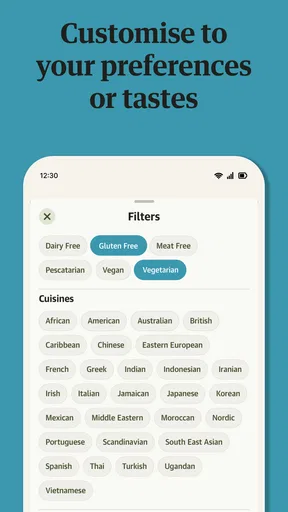
One feature I particularly enjoyed is the ability to filter recipes by dietary preferences. Whether you're vegetarian, gluten-free, or looking for something keto-friendly, Guardian Feast has you covered. It makes finding the right dish for your needs a seamless experience.
Cooking Made Easy
Now, I’m not exactly the world’s best chef, but with this app, that didn’t seem to matter. The step-by-step instructions are clear and concise, making even the most complex dishes feel manageable. I attempted the "Spicy Thai Noodles" recipe, and let me tell you, the results were impressive, if I do say so myself!
What’s more, the app includes handy tips and tricks to enhance your cooking skills. From knife techniques to seasoning secrets, these little nuggets of wisdom are like having a chef mentor right in your kitchen.
Stay Inspired and Organized
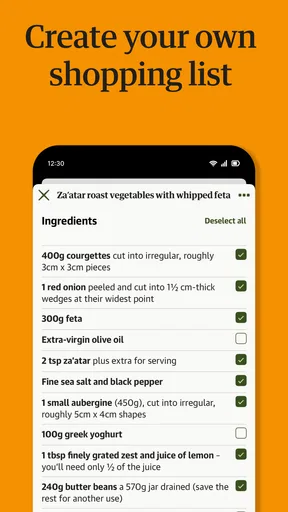
Guardian Feast goes beyond just recipes; it’s like having a personal kitchen assistant. The app allows you to save your favorite recipes, creating a personalized cookbook that you can refer back to anytime. Plus, the integration with a grocery list feature is a lifesaver. No more scribbling ingredients on pieces of paper; everything is organized and ready for your next shopping trip.
Another gem within the app is the community feature. Users can share their own recipes and tips, creating a vibrant culinary community. It’s inspiring to see what others are whipping up and to exchange ideas and feedback.
A Few Final Thoughts
In a world where apps come and go, Guardian Feast: Daily Recipes stands out as a must-have for anyone passionate about cooking. It combines the joy of discovering new recipes with practical tools to improve your cooking game. The app is like a delicious blend of inspiration, knowledge, and community, all wrapped up in a user-friendly package.
If you’re looking to explore new cuisines or simply want to shake up your weekly menu, give Guardian Feast a try. You might just find yourself falling in love with cooking all over again, one recipe at a time. Bon appétit!
Small habits that make recipe browsing more useful
One way I’d get more out of the daily selection is to treat it as a prompt rather than an obligation. If the featured dish doesn’t suit the evening, I can use it as a jumping-off point: notice a cuisine or ingredient that appeals, then explore recipes that better fit the meal I need. That keeps the surprise element enjoyable without letting it dictate the menu.
I’d also separate recipes I genuinely plan to cook from ones I only admire. Saving every appealing dish can make a personal cookbook harder to navigate later. A smaller collection of proven favourites is easier to use when I’m tired, shopping quickly, or trying to remember a reliable meal. The grocery list becomes more helpful when I build it from a chosen recipe after checking what I already have, rather than copying every ingredient automatically.
How it compares with other ways to find dinner
Compared with a general web search, a dedicated recipe app can feel more cohesive: browsing, instructions, saved dishes, and a shopping list sit within the same cooking-focused experience. A web search may still be better when I need a very specific recipe, want to compare many independent versions, or am looking for a narrow dietary requirement. The app’s strength is the guided route from inspiration to cooking, not necessarily replacing every source I use.
Printed cookbooks have a different advantage: they’re pleasant to browse away from a screen and can be dependable references once I know what I want to make. But they don’t offer the same kind of rotating daily prompt or handy digital recipe collection described here. I’d use a cookbook for depth around a subject and this app when I want to discover something for tonight and keep the instructions close at hand.
There is a trade-off in relying on any curated recipe source: the dishes that catch my eye may not match what’s affordable or available in my local shop. I’d check for substitutions before committing, and if a recipe depends on an unfamiliar ingredient, decide whether I’m happy to seek it out or would rather choose another dish. That practical check matters more than an attractive image when dinner has to work in real life.
A realistic weeknight test
Picture me getting home with a short window to prepare dinner and no firm plan. I’d open the app, scan the meal categories, and use the dietary filter if I were cooking for someone with a known preference. Before settling on a recipe, I’d inspect its ingredient list and instructions for anything that would slow me down. If it looks manageable, I’d add the missing items to the grocery list; if not, I’d keep browsing instead of discovering the problem halfway through cooking.
That routine is where the combination of browsing and organization can save effort. It does not magically make a complicated dish quick, nor does a list ensure I have everything in the kitchen. The benefit is more modest and useful: I can make a decision, check what I need, and have the directions available while I cook. For a household that improvises meals day by day, that can be more valuable than an elaborate plan that nobody follows.
Questions I’d settle through my own use
Would I need to pay to try it? No: the app is free to download, with optional in-app purchases ranging from $3.99 to $38.99 per item. I’d begin without buying anything and consider a purchase only after identifying a specific benefit I’d use repeatedly. The price range is broad enough that I would read the in-app details carefully before confirming a purchase.
Is it useful if I’m new to cooking? The clear, step-by-step style and cooking tips make it approachable, based on the experience described here. I’d still read the whole method first and allow extra time when a technique is unfamiliar. A guided recipe can reduce uncertainty, but it cannot replace basic care around heat, knives, and food handling.
Can it help with dietary preferences? The filters can narrow the choices, which is a useful starting point. For a serious allergy or strict medical diet, I would inspect every ingredient and preparation detail rather than rely on a filter alone. That cautious habit applies to recipes from any source, especially when someone else is cooking or eating the meal.
Will it plan every meal for me? I’d see it primarily as a source of recipes and supporting kitchen tools, not assume it will automatically build a complete weekly schedule around my household. Someone who wants a detailed planner should compare dedicated planning apps before settling on this one. For flexible, day-to-day inspiration, its approach makes more sense.
My verdict on paying, trying, or passing
Guardian Feast: Daily Recipes is easiest to recommend as a free starting point for curious cooks who value fresh ideas, readable directions, and a place to keep dishes they want to revisit. Its daily recipe, filters, saved collection, grocery-list feature, and community angle give it several routes into a cooking routine, while its Food & Drink focus is clear. The app is rated for Everyone and requires Android 8.0 or later; it was released on June 25, 2024, and its current version is 1.0.0.683.
I’d try it if I want to broaden my home cooking without paying before I know whether the experience suits me. I’d pass, or choose a more specialized alternative, if my main need is strict dietary verification, detailed nutrition tracking, or highly structured meal planning. The right value is personal: if I return to it when deciding what to cook and its optional paid content earns a place in my routine, it has done its job. If I only browse occasionally, free access may be all I need.
Pros
- User-friendly interface with intuitive navigation.
- Extensive recipe collection updated regularly.
- Includes dietary preference filters.
- Step-by-step cooking guides with images.
- Offline access to saved recipes.
Cons
- Limited customization for ingredient lists.
- Occasional ads disrupt user experience.
- Requires internet for full recipe access.
- No meal planning or shopping list feature.
- Lacks integration with smart kitchen devices.
FAQs for Guardian Feast: Daily Recipes
What is Guardian Feast: Daily Recipes?
Guardian Feast: Daily Recipes is a culinary app designed to inspire both novice and experienced cooks with a diverse range of recipes. It offers daily updates, step-by-step cooking instructions, and nutritional information, making it an essential tool for anyone looking to expand their culinary repertoire.
Is Guardian Feast: Daily Recipes free to use?
Yes, Guardian Feast: Daily Recipes is free to download and use. However, it may offer in-app purchases or premium features, such as exclusive recipes or ad-free browsing, which can enhance your cooking experience and provide additional benefits.
What types of recipes are available in the app?
The app features a wide variety of recipes, catering to different dietary preferences and cuisines. Whether you’re looking for vegetarian, vegan, gluten-free, or international dishes, Guardian Feast has something for everyone. The daily updates ensure you always have fresh ideas to try in your kitchen.
Does the app require an internet connection to function?
While Guardian Feast: Daily Recipes can store some content offline, an internet connection is required to access the latest daily recipes and updates. This ensures that users receive the most current and diverse options available, enhancing their cooking experience with new ideas regularly.
Can I share recipes from Guardian Feast with friends or family?
Yes, Guardian Feast allows users to share their favorite recipes via social media, email, or messaging apps. This feature makes it easy to spread culinary inspiration and collaborate with others on meal planning or cooking, fostering a community of food enthusiasts.


